


Highway Weather
3.4895.00 Reviews
App Specs
- Version
- 6.128
- Updated On
- License
- Free
- Downloads
- 500,000+
- Developer
- Weather Route, Inc.
- Categories
- Weather
- Platform
- Android, iOS
Screenshots
 Analysis by AppCompare
I think the most useful way to judge a travel weather app is to ask what decision it helps me make before I leave, not just how many numbers it can put on a screen. Highway Weather is aimed at that practical question: what conditions might I meet as my drive unfolds? That focus makes it different from opening a general forecast for the town where I am now. It also means I would treat it as a planning aid, not as a substitute for attentive driving or a guarantee that a route will be safe.
Why trust matters on a trip
Weather information becomes personal when it can influence when I depart, where I stop, and whether I keep driving. I would use a forecast to prepare, but I would not let an alert pressure me into checking a phone behind the wheel. Before setting off, I’d review the route and conditions while parked, then make any changes safely. If weather deteriorates unexpectedly, a passenger can check the app, or I can pull over somewhere appropriate.
That distinction is important because a forecast is not the same thing as a live road-safety assessment. Conditions can change between checks, and a route that looks manageable on a screen may still require slowing down, stopping, or choosing another plan. For me, the app’s value is in helping me anticipate questions to consider, such as whether to leave earlier or schedule a break, rather than making those decisions automatically.
What I would check before relying on it
I would begin with a short, familiar drive and see whether the route and forecast presentation make sense to me before using the app for a long journey. I’d also check the current app-store details for the permissions it requests and review the available privacy information and account controls before entering anything sensitive. Those are sensible checks for any weather app; I wouldn’t assume what Highway Weather collects or how it handles information without reviewing its own current disclosures.
Highway Weather is a free weather app from Weather Route, Inc., with optional in-app purchases listed from $3.99 to $17.99 per item. It has a 3.5 average from around 2,200 ratings, with roughly 886 written reviews, and has passed 100,000 installs. It is rated for Everyone, first appeared on January 24, 2013, and its current version is 6.127, with Android 7.0 as the minimum requirement. Those figures help set expectations about its footprint, but they don’t tell me whether its forecasts will suit a particular drive; I’d judge that by using it for my own routes.
Getting Started with Highway Weather
First things first, downloading Highway Weather was a breeze. Available on both Android and iOS, you can easily find it in your respective app store. Once installed, the app greets you with a clean and intuitive interface. I was impressed with how seamlessly it guided me through setting up my first trip. You simply enter your starting point and destination, and voilà, you’re ready to hit the road.
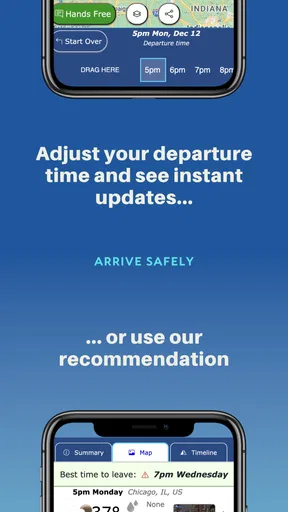
The setup process is straightforward, and the app quickly calculates your route. What’s cool is that it doesn’t just give you a boring straight path; instead, it offers alternatives based on different weather scenarios. Highway Weather automatically suggests the safest and most efficient route, which is a huge plus for safety-conscious travelers like myself.
Worth Reading Before You Choose

EA SPORTS FC Mobile 26 Is a Bigger Football Game, but It Takes Time

Flipboard Shows What News Apps Must Do Beyond the Feed

Switching to Android Auto Means Rethinking Your Driving Routine

Google Calendar Makes a Crowded Week Easier to Manage

Ludo King Makes the Most of the Minutes Between Plans

Baby Panda World Brings Quick Play to Modern Phones, but Its Game Library Feels Busy
Features That Stand Out
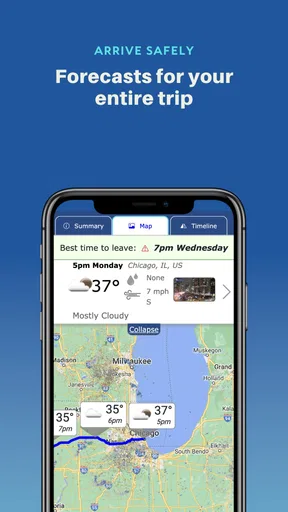
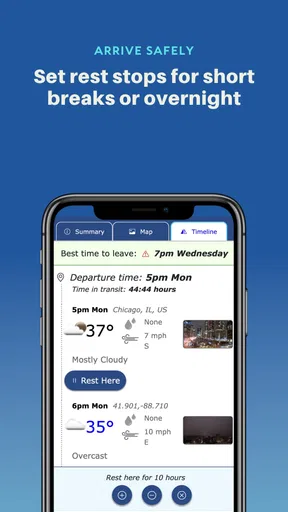
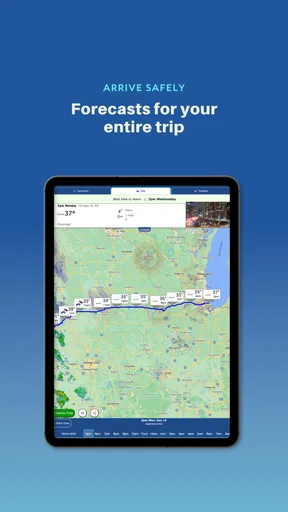
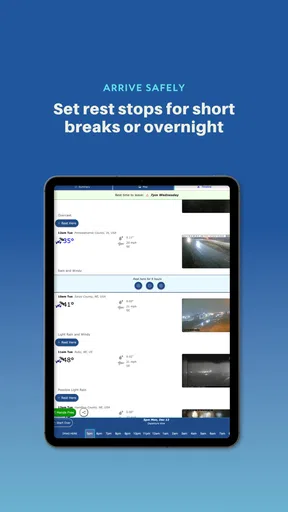
Now, let’s talk features. The app is packed with handy tools designed to make your trip as smooth as possible. One feature I found particularly useful was the real-time weather updates. You get detailed forecasts including temperature, precipitation, wind speed, and even visibility along your route. This level of detail makes it feel like you have your own personal meteorologist riding shotgun.
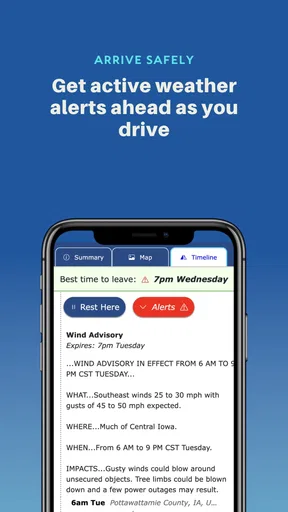
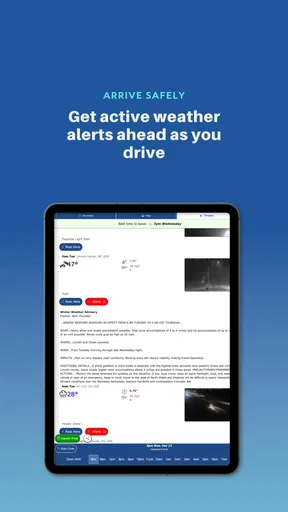
Another feature worth mentioning is the ability to customize alerts. You can set up notifications for severe weather conditions, ensuring you’re never caught off guard. This came in handy during my own trip when a storm was brewing ahead, and I was able to reroute with ease.
Making the forecast useful on an ordinary drive
A realistic use is a weekend drive that crosses several towns. A forecast for the starting point may look clear while rain or strong wind is expected farther along. I’d enter the destination before leaving, scan the conditions along the route, and use that information to decide whether to pack rain gear, allow more time, or plan a stop before the weather changes. The point is not to watch the screen continuously; it is to do the thinking before the car is moving.
For a longer drive, I’d check again during a planned break rather than treating one early forecast as fixed for the whole day. That gives me a chance to reassess without turning the app into a distraction. If the route changes, I’d review the new journey while parked. This workflow is more useful than simply opening a weather app at the destination, because it prompts me to consider conditions between the two ends of the trip.
Where it fits among weather and navigation apps
A standard weather app is often the simpler choice when I only need the forecast for home, a destination, or a single stop. A navigation app is usually the better tool when my main concern is directions or traffic. Highway Weather occupies a narrower role: it puts travel conditions along a drive at the center of the planning task. I would use it alongside whichever navigation tool I already trust, rather than expecting one app to replace both a detailed local forecast and turn-by-turn guidance.
That division of labor is a practical trade-off. Checking two apps takes a little extra preparation, but it can keep the questions clear: use the weather tool to think about conditions and the navigation tool to follow the road. If I need traffic-aware rerouting above all else, a navigation app built around traffic is likely a better fit. If I’m staying in one place, a conventional forecast may be quicker and less effort.
Performance and Usability
Performance-wise, the app runs smoothly without any noticeable lags or crashes, which is crucial when you’re relying on it for real-time updates. The developers have clearly put a lot of thought into the user experience. Navigation is intuitive, making it easy for even the least tech-savvy among us to use effectively.
One aspect I particularly appreciated was the option to download offline maps. This is a lifesaver when traveling through areas with spotty cell service. It ensures you’re never left stranded without guidance, which, trust me, is a relief when you’re in the middle of nowhere.
Small checks that improve the experience
Before a trip, I’d confirm that the origin and destination are correct and make sure the route shown is the one I actually intend to take. A weather view is only useful if it corresponds to the drive I plan to make; a changed stop or detour can alter what I need to know. I’d also note the forecast before departure instead of trying to interpret a detailed screen while driving. These habits don’t require extra app features, but they reduce the chance that I mistake an old or irrelevant plan for current guidance.
Offline maps, as described in the original experience above, can help with map access in weak-service areas, but I would not assume that every live forecast or alert remains available offline. I’d prepare for poor reception by checking conditions in advance and keeping a sensible backup plan. Offline navigation and updated weather are separate needs, so I wouldn’t rely on one to guarantee the other.
Who should choose it—and who might not
I’d recommend trying Highway Weather if I were planning a drive through changing conditions, especially when the route itself matters more than the forecast at either endpoint. It can also suit people who make regular highway trips and want a dedicated place to review weather along the way. The app’s focused purpose is appealing when I have a real journey to plan, rather than just a passing interest in the day’s forecast.
I’d skip it if I rarely travel by car, want one app to handle traffic and navigation, or only need a quick look at local weather. It may also feel like unnecessary preparation for a short, familiar trip in stable conditions. In those cases, the phone’s usual weather or navigation app may be enough, and adding another tool can create more steps than value.
Performance and Usability
Performance-wise, the app runs smoothly without any noticeable lags or crashes, which is crucial when you’re relying on it for real-time updates. The developers have clearly put a lot of thought into the user experience. Navigation is intuitive, making it easy for even the least tech-savvy among us to use effectively.
One aspect I particularly appreciated was the option to download offline maps. This is a lifesaver when traveling through areas with spotty cell service. It ensures you’re never left stranded without guidance, which, trust me, is a relief when you’re in the middle of nowhere.
Room for Improvement
While Highway Weather offers a lot, there’s always room for improvement. One area I’d like to see enhanced is the integration with other navigation apps. Currently, it runs as a standalone app, but having the option to sync with popular navigation apps like Google Maps or Waze would be a game-changer.
Additionally, while the app does an excellent job with weather details, expanding its scope to include traffic updates would be fantastic. It’s great to know what the weather is, but knowing about potential traffic snarls would make trip planning even more efficient.
Questions I would answer before a long journey
Does it replace my usual navigation app? I wouldn’t treat it that way. The most sensible approach is to use it for weather planning and keep a navigation app available for directions and traffic, particularly if traffic changes are central to my route. Can I count on it without mobile service? The offline-map option is helpful for map access, but I’d check weather before losing coverage and avoid assuming that live updates will continue where the signal does not.
Is it worth paying for? The app is free to start, while in-app purchases are available; I’d first decide whether the core travel-weather workflow meets my needs and only consider a purchase if an offered item clearly adds something I want. Should I follow an alert as an instruction? No. I’d use it as a prompt to reassess while safely stopped, then make a judgment based on conditions and, when needed, official local guidance. That is a more careful way to use any forecast on the road.
The Verdict
All in all, Highway Weather is a solid companion for anyone planning a road trip. Its detailed weather forecasts, customizable alerts, and offline map capabilities make it a must-have for travelers. While it’s not perfect, the app’s strengths far outweigh its minor shortcomings. If you’re planning a trip and want to ensure you’re prepared for whatever Mother Nature throws your way, this app is definitely worth a download.
In conclusion, whether you’re a frequent road-tripper or just someone who likes to be prepared, Highway Weather has something to offer. It’s user-friendly, reliable, and a great tool to have in your travel arsenal. So, next time you’re hitting the highway, give it a try and travel with peace of mind.
A cautious way to make the call
My recommendation is conditional rather than universal: I’d install it when I have a trip where weather along the route could affect timing or comfort, then test the workflow on a journey where I can comfortably compare the forecast with what I encounter. I would keep location and other access choices limited to what the app asks for and what I’m comfortable allowing, and review those choices in the device settings. I wouldn’t infer its data practices from its purpose or assume that a particular account option exists; I’d make those decisions only after seeing the app’s current disclosures and controls.
For me, the strongest reason to try it is its trip-centered perspective. Its weakest fit is any situation where I expect it to be a complete travel command center, combining weather, traffic, and navigation in one place. Used as a focused planning companion—with privacy choices checked, forecasts treated as guidance, and phone use kept out of active driving—it can make a weather-sensitive road trip easier to think through without asking it to make the journey’s decisions for me.
Pros
- Accurate weather forecasts for trip duration.
- Easy-to-use interface with clear visuals.
- Customizable notifications for weather alerts.
- Integrates smoothly with Google Maps.
- Provides alternative routes based on weather.
Cons
- Limited offline functionality.
- Requires location access for full features.
- May drain battery with constant updates.
- Ads can be intrusive in free version.
- Subscription needed for premium features.
FAQs for Highway Weather
What features does Highway Weather offer to enhance my travel experience?
Highway Weather provides real-time weather updates, route-based forecasts, and alerts for adverse conditions. It offers a detailed map view showing weather patterns along your route, allowing you to plan safe and efficient travels. The app also includes options to customize notifications and set preferences based on your travel needs.
How accurate are the weather forecasts provided by Highway Weather?
Highway Weather uses data from reputable meteorological sources to provide accurate and up-to-date forecasts. While no weather prediction can be perfect, the app's integration of multiple data streams ensures a high level of reliability, helping you anticipate weather changes and make informed travel decisions.
Does Highway Weather support offline usage during travel?
Highway Weather primarily relies on internet connectivity to provide the latest weather updates and route information. However, it allows users to download certain data beforehand, enabling limited offline functionality. This feature ensures that you have access to essential information even in areas with poor connectivity.
Can Highway Weather be integrated with other navigation apps?
Yes, Highway Weather can be seamlessly integrated with popular navigation apps like Google Maps and Waze. This integration allows users to receive weather updates directly within their preferred navigation interface, ensuring a smooth and informed driving experience without the need to switch between apps.
Is Highway Weather available for both Android and iOS devices?
Highway Weather is available for download on both Android and iOS platforms. The app is regularly updated to ensure compatibility with the latest operating systems, providing a consistent and reliable user experience across different devices. You can find it on the Google Play Store and the Apple App Store.


